CC - Using Cloud Storage Services
All cloud providers offer similar services. However storage services differ in details.
Two Access Methods:
- Portals
- REST APIs
Portals
All features are accessible in few clicks.
Pro:
- Good for propotyping
Cons:
- Not comfortable for reptetitive tasks
- Not suitable for dealing with thousands of objects
- Useless in automation
Rest APIs
Application Programming Inrface.
They use representational state, https verbs based. It is organized in SDKs. Usually easy to use in Python. It is different by cloud providers.
Programming Libraries
Each cloud provider offers unique services and SDKs. Libraries homogenise programmatically cloud access.
Some Examples:
- CloudBridge: cloudbridge
- Libcloud: libcloud.apache.org
Features minimum common denominator.
Example Scenario
Consider a simple binary file. Metadata are stored in CSV. The Row format is: Item id, experiment id, date, filename, comment string.
Some extra materials can be found on: cloud4scieng.org
Collection of data samples stored on the local resource For each sample, 4 metadata items:
- Item number
- Creation date
- Experiment id
- Comments
Upload data to the cloud and share data with collaborators.
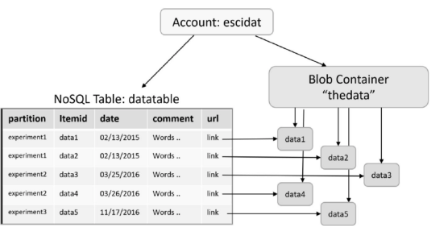
- NoSQL Table is used to store metadata
- Object Store (Blob Container) is used to store data, the NoSQL table contains in the “url” column, for each row, a link the location of the data in blob container
Using Amazon Cloud Storage Services
Let’s apply AWS to Example Scenario:
- S3 for BLOBs
- DynamoDB for tables
Access credentials:
- Key pairs: Access Key, Secret Key,
- IAM Management Console
Note: if possible don’t use root access.
Configure credentials in a safe way:
cd $HOME
mkdir .aws
cd .aws
cat >config << EOF
[default]
region=us-west-2
output=json
EOF
chmod 600 config
The Amazon Python Based SDK is called Boto3.
To create a Python environment use Python venv, then: pip install boto3.
Authentication is done using:
import boto3
s3 = boto3.resource( 's3',
	aws_access_key_id='YOUR ACCESS KEY',
	aws_secret_access_key='your secret key' )
NB: this script uses hard coded credentials, but it’s a bad practice. It’s better to have a .aws directory in $HOME with the key and secrete saved here.
To create a bucket:
import boto3
s3 = boto3.resource('s3')
s3.create_bucket(
	Bucket = 'datacont',
	CreateBucketConfiguration={
		'LocationConstraint': 'us-west-2'
	}
)
To upload a file:
import boto3
s3 = boto3.resource('s3')
s3.Object('datacont', 'test .jpg' ).put(
	Body=open( '/home/mydata/test.jpg' , 'rb ')
)
To create a DynamoDB table:
import boto3
dyndb=boto3.resource('dynamodb',region_name='us-west-2')

table = dyndb.create_table(TableName='DataTable',
	KeySchema =[
		{'AttributeName':'PartitionKey','KeyType': 'HASH'},
		{'AttributeName':'RowKey','KeyType':'RANGE'}
	],
	AttributeDefinitions=[
		{'AttributeName':'PartitionKey','AttributeType':'S'},
		{'AttributeName':'RowKey','AttributeType': 'S' }
	]
)
table.meta.client.get_waiter(' table_exists ').
	wait(TableName=' DataTable')
To use an already defined DynamoDB table:
import boto3
dyndb=boto3.resource('dynamodb',region_name='us-west-2')

table = dyndb. Table (" DataTable ")
To upload data to the table:
import boto3, csv
dyndb=boto3.resource('dynamodb',region_name='us-west-2')

table = dyndb. Table (" DataTable ")
urlbase = "https://s3-us-west-2.amazonaws.com/datacont/"
with open( '\path-to-your-data\experiments.csv' , ' rb') as csvfile:
	csvf = csv.reader(csvfile,
		delimiter =',',
		quotechar='|'
	)
	for item in csvf:
		body=open('path-to-your-data\datafiles\\'+item[3],'rb ')
		s3.Object('datacont',item[3]).put(Body=body)
		md=s3.Object('datacont',item[3]).Acl().put(ACL='public-read')
		url= urlbase +item [3]
		metadata_item={
			'PartitionKey':item[0],
			'RowKey':item[1],
			'Description':item[4],
			'Date':item[2],
			'Url':url}
		table.put_item(Item= metadata_item)
Using Microsoft Azure Storage Services
Let’s apply Azure to Example Scenario:
- Azure Storage for BLOBs
- Azure Tables for tables
Access credentials:
- Key pairs: Personal ID, Subscription ID
Storage Services
Storage Accounts Higher level abstraction than buckets
5 types of objects:
- Blobs
- Containers
- File Share
- Tables
- Queues
BLOBs are stored in bucket-like container As S3 can have a pseudo-directory structure
Now we will see azure python SDK.
Storage account can be created from the azure web interface or using the API.
Some example python SDK code for the API:
import azure.storage
from azure.storage.table import TableService, Entity
from azure.storage.blob import BlockBlobService
from azure. storage.blob import PublicAccess

# First , access the blob service
block_blob_service = BlockBlobService(
	account_name='escistore',
	account_key='your storage key'
)
block_blob_service.create_container(
	'datacont',
	public_access=PublicAccess.Container
)

# Next , create the table in the same storage account
table_service = TableService(
	account_name='escistore',
	account_key=' your account key'
)

if table_service.create_table(' DataTable'):
	print("Table created"
Else:
	print("Table already there")
Then upload data to BLOBs:
import csv
with open(
	'\path-to-your-data\experiments.csv' ,
	'rb') as csvfile:
	csvf = csv.reader (csvfile , delimiter =',',quotechar='|')

	for item in csvf:
		print(item)
		block_blob_service.create_blob_from_path(
			'Datacont',
			item[3],
			"\path-to-your-files\datafiles\\"+item[3]
		)
		url="https://escistore.blob.core.windows.net/datacont/"+item[3]
		metadata_item={
			'PartitionKey':item[0],
			'RowKey':item[1],
			'description' :item[4],
			'date':item[2],
			'Url':url
		}
		table_service.insert_entity(
			'DataTable',
			metadata_item)
Query on metadata using Azure Table:
tasks=table_service.query_entities(
	'DataTable',
	filter="PartitionKey eq 'experiment1'",
	select='url'
)

for task in tasks:
	print(task.url)
Azure and Amazon have similar BLOBs and Table storage. However the object management differs in typologies and high level representation. The two SDKs are different.
Using Google Cloud Storage Services
Let’s apply Google Cloud Storage to Example Scenario
- Google Cloud ObjectStore for BLOBs
- Google BigTables for tables with NOSQL or DataStores for tables with SQL
CLI for Google Cloud allows to perform all credentials related operations, interact with buckets, computing and more from command line. However with gsutil it is not straightforward to perform SDK authentication.
Can be installed from sdk.cloud.google.com
BLOBs are stored in bucket container, each bucket must have unique name, use an UUID to be sure about that.
pip install google-cloud-storage
pip install google-cloud-bigtable
pip install google-cloud-datastore
To Create a bucket:
from google.cloud import storage

client = storage.Client()

# Create a bucket with name 'afirstbucket'
bucket = client.create_bucket('afirstbucket')

# Create a blob with name 'my-test-file.txt' and load some
datablob = bucket.blob('my-test-file.txt')
datablob.upload_from_string('this is test content!')
datablob. make_public()
Bigtable is the progenitor of Apache HBase.
The NoSQL store built on the Hadoop Distributed File System (HDFS).
Bigtable and HBase are designed for large data collections.
Provisioning a Bigtable instance requires provisioning a cluster of servers. This task is most easily performed from the console.
BigTables example code:
from google.cloud import bigtable

clientbt = bigtable.Client(admin=True)

instance=clientbt.instance('cloud-book-instance')
table=instance.table('book-table')
table.create()

# Table has been created

column_family = table.column_family('cf ')
column_family.create()

# now insert a row with key 'key1' and columns 'experiment',
# 'date', 'link'

row = table.row('key1')
row.set_cell('cf', 'experiment', 'exp1')
row.set_cell('cf', 'date', '6/6/16 ')
row.set_cell('cf', 'link', 'http ://some_location')
row.commit()
The following example implement DataStore with ACID Semantics:
from google.cloud import datastore

clientds = datastore.Client()
key=clientds.key('blobtable')

# Table has been created

entity = datastore.Entity(key=key)
entity['experiment-name ']='experiment name'
entity['date']='the date'
entity['description']='the text describing the experiment'
entity['url']='the url'

clientds.put(entity)
from google.cloud import storage, datastore
import csv
client = storage.Client()
clientds = datastore.Client()
bucket = client.bucket('afirstbucket')
key = clientds.key('blobtable')
Upload data to the table:
with open('\path-to-your-data\experiments.csv','rb') as csvfile:
	csvf = csv.reader(csvfile,delimiter=',',quotechar='| ')
	for item in csvf:
		print(item)
		blob=bucket.blob(item[3])
		data=open("\path-to-your-data\datafiles\\"+item[3],'rb')
		blob.upload_from_file(data)
		blob.make_public()
		url="https://storage.googleapis.com/book-datacont/"+item[3]
		entity=datastore.Entity(key=key)
		entity['experiment-name']=item[0]
		entity['experiment-id']=item[1]
		entity['date']=item[2]
		entity['description']=item[4]
		entity[' url ']=url
		clientds.put(entity)
Query on metadata using DataStore:
query=clientds.query(kind=u'book-table')

query.add_filter(u'experiment-name', '=', 'experiment1')

results=list(query.fetch())

urls = [ result ['url '] for result in results]
Conclusions
The Object Storage and Table Storages methodologies are pretty similar.