CC - Computing As a Servce and GPGPU as a Service
- Source: Slide + Cloud Computing for Science and Engineering by Ian Foster and Dennis B. Gannon
Introduction
- Infrastructure as a Service (IaaS) because it provides virtualized infrastructure to its users
- Cloud allows instant deployable computing power.
- There is no queue: the resources are allocated and consumed:
- More CPUs than in the user availability.
- Expensive high-end GPGPU devices.
- Diverse and different environments for product testing.
Access computing power from anywhere, anytime, any device. ]]
Computing as a service
- CPUs, RAM, storage, GPUs, FPGAs on demand
- Elasticity
- Scalability
- Pay as you go
- Pay how much you can: make a bid
- Private clouds
- Public clouds
- Cloud burst
- Scaling: CC - Scaling in the Cloud
Virtualization
- When you compute in the cloud, you do not run directly on one of these servers in the way that you would in a conventional computational cluster
- Instead, you are provided with a virtual machine hosts an operating system, and the custom software runs on this machine
- A virtual machine is a software image of a complete machine that is loaded on the compute server.
The server in the data center runs a piece of software called a hypervisor that allocates and manages the server’s resources that are granted to its “guest” virtual machines.
- The hypervisor grants the server resources to the virtual machines
- Different operating systems are packed of the hypervisor.
- The computing servers are managed in a homogeneous way.
The cloud management system is called also fabric controller can select which server to use to run the requested VM instances, and it can monitor the health of each VM.
If needed, the cloud monitor can run many VMs simultaneously on a single server. If a VM instance crashes, it does not crash the server.
An instance of a virtual machine is a running virtual machine started from its image.
Many instance of the same virtual machine on the same (or different server).
Advantages/Capabilities:
- Instance recovery in case of crash.
- Instance health
- Instance load
- Balance between costs and performance
Containerization
Containers are similar to virtual machines. But they are based on a different virtualization technology. Layered on top of the host operating system.
Operating system level virtualization.
Advantages:
- Extremely lightweight
- More effective, instant deployment
- All dependencies and applications are packaged in a container
- Atomic unit simple to manage
Example:
- Container 1: web server
- Container 2: database server
Persistent disk can be hosted on the physical machine.
Example:
- Package: Sweep parameters application.
Multiple containers’ instances with different parameters.
- Packaging an application in a container is a simple task.
- Container definition script language.
Requirements:
- Libraries
- Dependencies
- Source files
- Data
The script runs on a laptop for testing and on a remote cloud compute server for production.
Portability:
- Containers are portable between different clouds.
- It is possible, but not really easy move virtual machine images from one cloud to another.
However:
- Virtual machines take minutes to be up and running.
- Virtual machines are more isolated.
Containers also have downsides:
- The most serious issue is security. Because containers share the same host OS instance, two containers running on the same host are less isolated than two VMs running on that host.
- Managing the network is tricky: ports and IP addresses used by containers can be slightly more confusing than when working with VMs.
- Containers are often run on top of VMs, which can exacerbate the confusion.
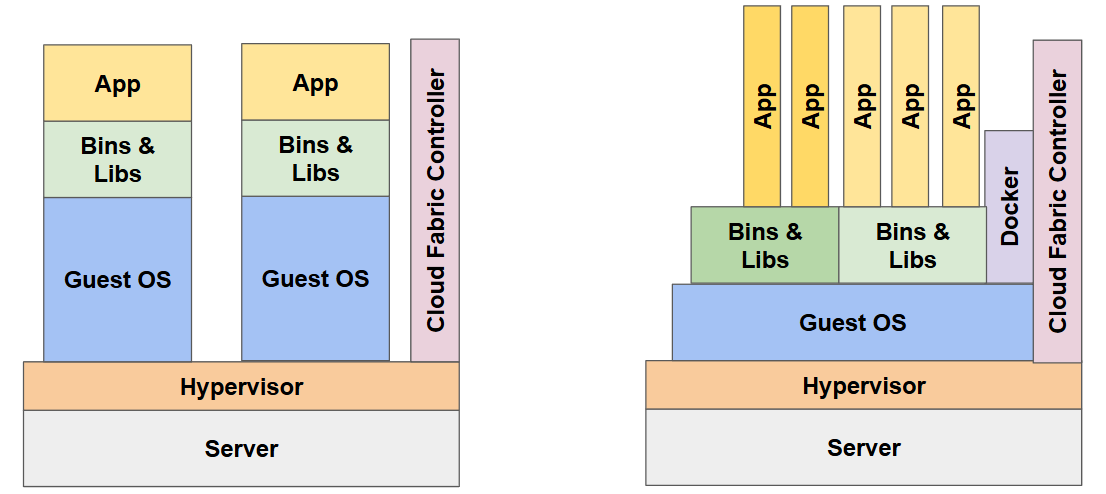
Virtual machines vs containers on a typical cloud server
Advanced Computing Services
- Infrastructure as a Service is just the foundation of the computing in the cloud.
- Cloud vendors (Amazon, Microsoft, Google) have dedicated services.
A common issue of concern is scale. The most part of today applications are data massive. Run parallel tools is not the exception, but the regular way:
- Data analysis clusters.
- Tools for massive streams of events.
- Machine learning tools.
Various ways to manage parallelism:
- High performance computing using Message Passing Interface (MPI)
- Virtual clusters (Amazon, Microsoft Azure)
- Many task parallelism (MTP) : massive number of independent task to run in a embarassing parallel way.
- Bulk synchronous parallelism (BSP)
- MapReduce (Apache Hadoop)
- Spark (interactive using Jupyter)
- Cloud Datalab (Google) - based on Jupyter
- Cloud Business Intelligence (Microsoft Azure)
Scaling Containers:
- Docker Swarm or Kubernetes
High Throughput Condor (1985 but still widely used and developed) to manage many task parallel computation
- Class-AD - Resource specification language
- Used in European grid computing for decades alongside Globus 2 and GridFTP
MesOS: distributed operating system with web interface.
Dataflow and workflows:
- Galaxy / Globus Galaxy: bioinformatics https://www.globusgenomics.org
- Galaxy / Globus Galaxy-ES: earth science https://onlinelibrary.wiley.com/doi/abs/10.1002/cpe.3540
- DAGonStar: http://github.com/dagonstar
More: https://github.com/meirwah/awesome-workflow-engines
Serverless Computing
Having up and running a virtual machine instance on the cloud could be costly if the most part of the time is in idle.
- The effort needed to configure a service is not trivial
- The security have to be enforced.
- The scalability is an issue.
A service can be deployed and bounded to a web route without the need to be hosted to a dedicated machine.
The service is billed for the amount of the resources for the time that are used. The services are hosted in lightweight containers.
Serverless computing is cloud native/continuously upgraded.
Serveless computing is connected to PaaS solutions, see CC - Cloud as Platform - Data Analysis, Streaming and Machine Learning in the cloud
Pros and Cons of Public Cloud Computing
Pros
- Cost: Renting is cheaper than buying for short-term needs
- Scalability: Expand easily without managing physical hardware
- Access: Only viable option for teams without physical server space
- Configurability: Pre-built VMs/containers with standard software ready to go
- Variety: Dozens of configs — single-core to multi-core GPU systems
- Security: Enterprise-grade security; easy virtual network integration
- Upgradeability: Hardware always current; owned hardware obsoletes fast
- Simplicity: Web portal management; no sysadmin skills needed
Cons
- Cost: Pay-per-hour/byte adds up; on-prem may be cheaper if power/admin are subsidized.
- Variety: Cloud does not provide every type of computing that you may require. No substitute for top-500 supercomputers; HPC clusters exist but underperform
- Security: Sensitive data (e.g., HIPAA) may face compliance hurdles despite cloud support
- Vendor lock-in: Dependency on one provider, though improving as clouds converge on standards
Also Consider
- Initial Cost of Investment
- Total Cost of Ownership (TCO)
- Time to Market
GPGPU as a Service
Why GPGPU virtualization?
On-premises:
- Optimize computing infrastructure procurement;
- Minimize the total cost of ownership;
- Enable “unGPGPUed” machines to GPGPU computing (minimize teaching costs, time to market improvement).
On cloud:
- Allocate computing resources in a better way;
- “Rent” multiplexed GPGPUs - sell “fried air” :-) - improve the business!
- Save money on the cloud bill.
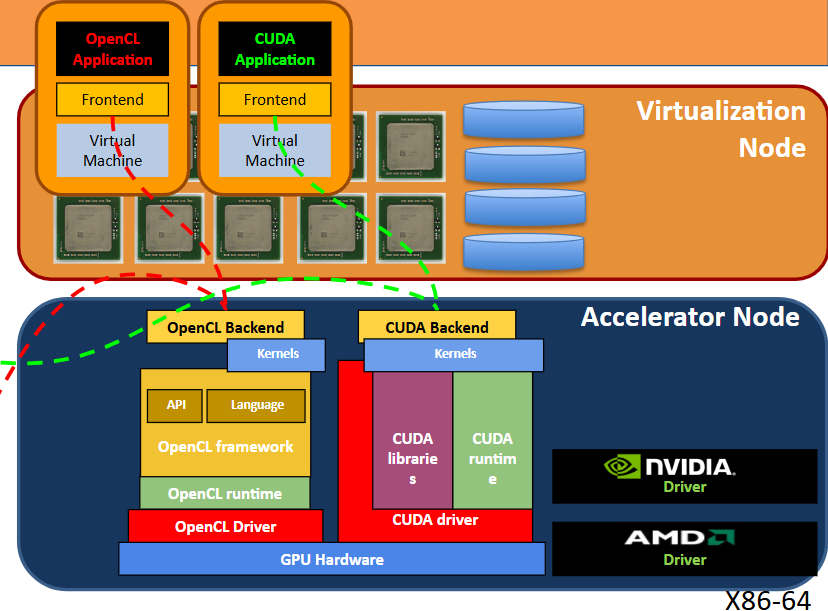
GVirtuS
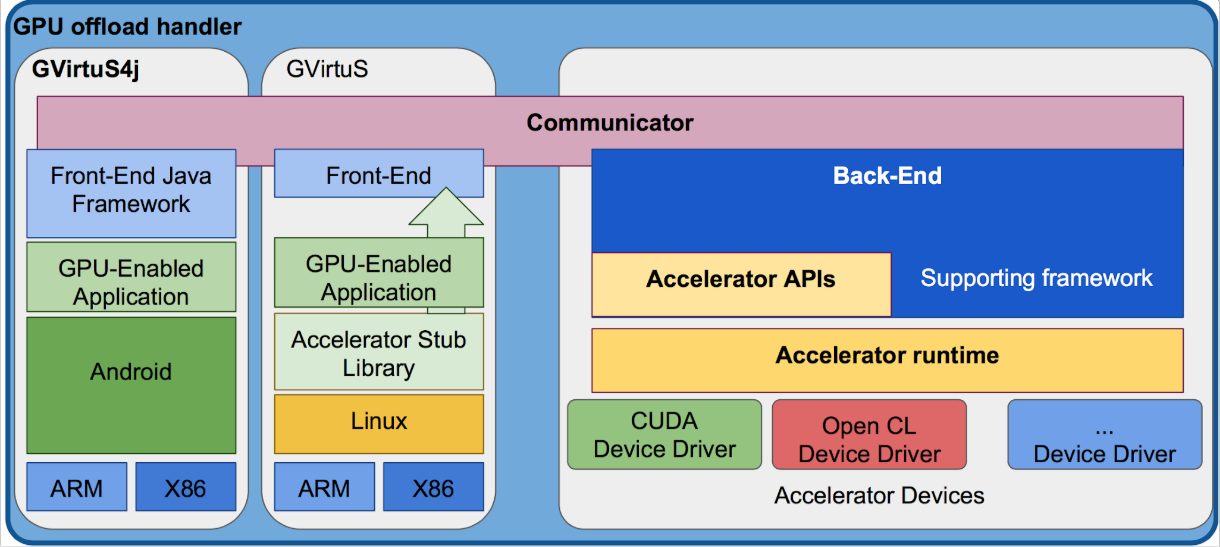
GVirtuS is a software component for GPGPU virtualization and “remoting”.
See CC - Paper 2 - Enabling the CUDA Unified Memory model in Edge, Cloud and HPC offloaded GPU kernels for the technical deep dive explaination of GVirtuS
Virtualization: Makes available a subset of CUDA API to virtual machines running on a host equipped with a CUDA enabled device. Remoting: Makes available a subset of CUDA API to a physical or virtual machine(s) using a remote host equipped with a CUDA device.
GVirtuS provides low power systems and devices with native high end GPGPU capabilities:
- CUDA|OpenCL Kernel offloading
- Transparent mocking CUDA|OpenCL APIs (Linux)
- Simple programming model (Java/Android - only CUDA)
GVirtus Execution Engine
Transparent:
- It is a “fake” CUDA|OpenCL runtime/driver library;
- When a CUDA|OpenCL enabled binary invokes a CUDA|OpenCL function, it invokes a stub library function imitating the regular one;
- GVirtuS makes the rest.
Independent:
- Producers: machines hosting GPGPU devices
- Consumers: machines running CUDA|OpenCL enabled binaries
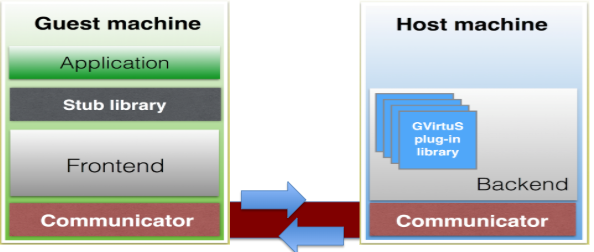
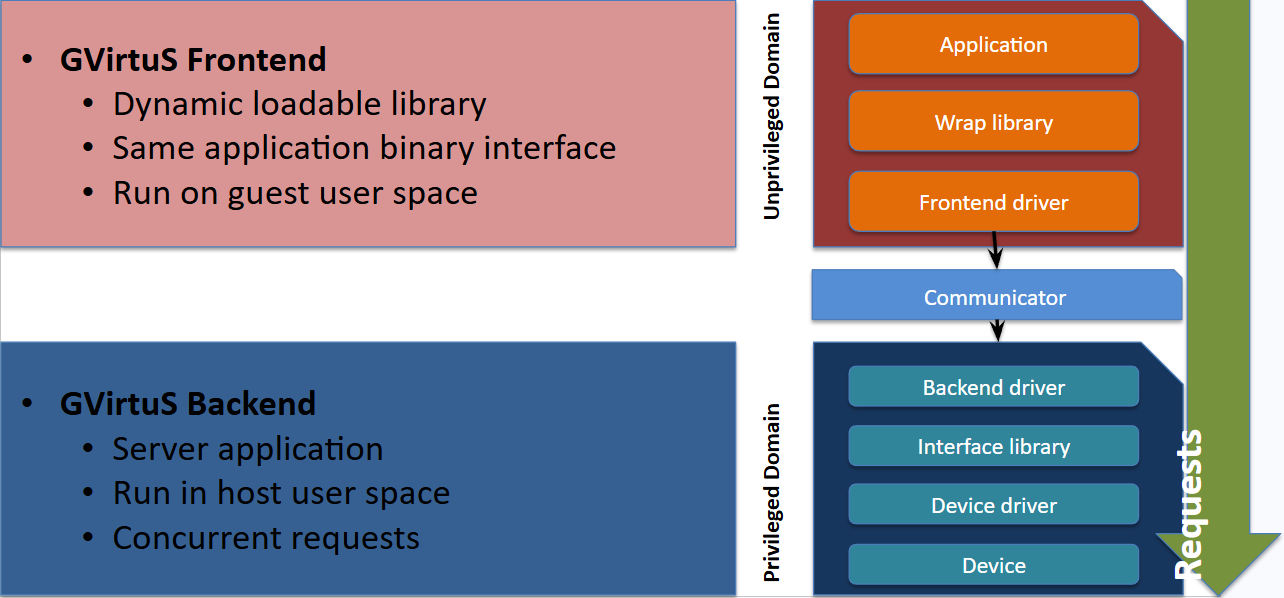
Between FrontEnd and BackEnd there is a communicator layer, for example TCP/IP but other examples of communicators are: for VMware, the Virtual Machine Communication Interface (VMCI) and for KVM/QEMU the VMchannel.
VMware:
- commercial hypervisor running at the application level
- provides a datagram API to exchange small messages
- a shared memory API to share data
- an access control API to control which resources a virtual machine can access
- and a discovery service for publishing and retrieving resources
KVM/QEMU:
- Linux loadable kernel module now embedded as a standard component
- supplies a high performance guest/host communication
- based on a shared memory approach
Other communicators like vm-channel and virt-io are under development for GVirtus
GVirtus on Android
The android key to success:
- JNI
- Librariers abstraction
- Common Java programming model
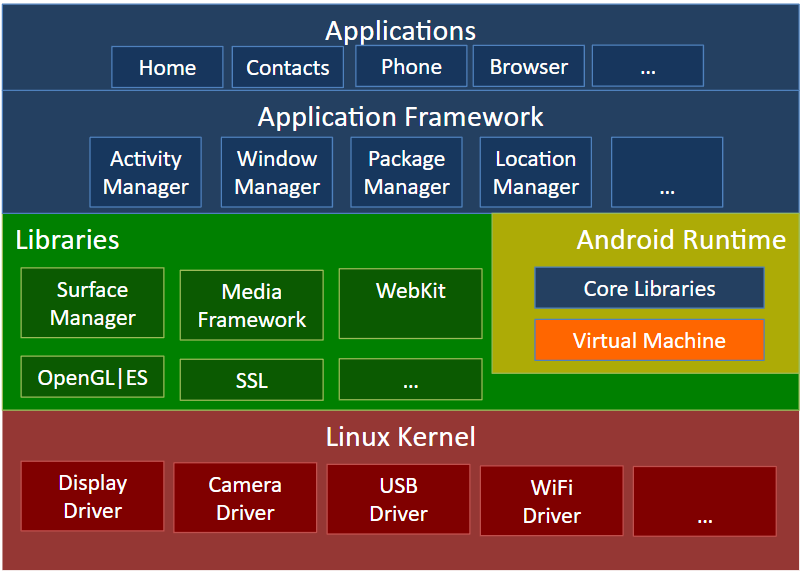
NVIDIA Shield TK1 Drawback: proprietary hardware closed source.
It is not possible, neverthless
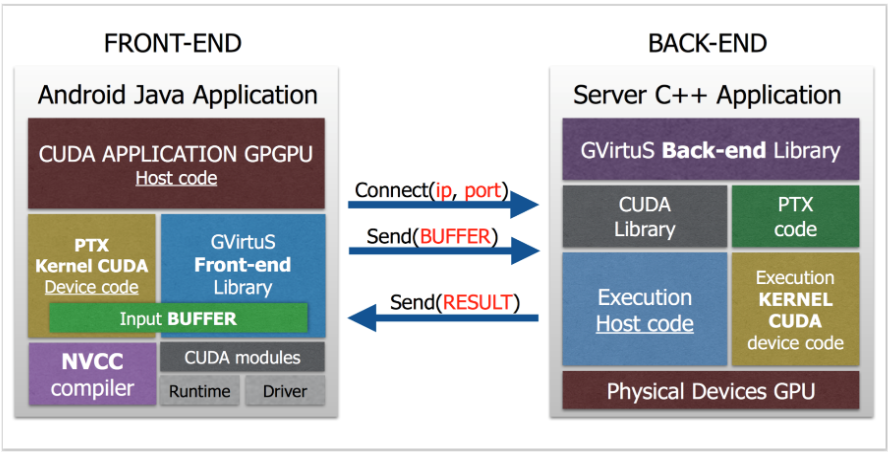
- Host code written in Java and using front-end library of GVirtuS4J-cuda
- device code (kernel CUDA that executes on the device) compiled using NVCC compiler and loaded explicitly in CUDA driver applications.
Conclusions - Why GPGPU remoting?
Low-power embedded devices:
- No GPGPU tiny hardware could exploit network proximal accelerator servers
- If the device has its own GPGPU different task could be split between local and remote (NVIDIA Jetson TK1 Biosurveillance Application by Herta)
Mobile device:
- Enable mobile developers to GPGPU programming.
- Recipe not good for all food: some apps could be great if remoted with GPU (the fallback is handled manually)
- The GPGPU kernel is embedded in the app (no need to setup and manege a web service infrastructure)
Using and Managing Containers
Interesting and versatile alternative in application encapsulation on the cloud.
Run application without source code modification and/or recompilation on any platform.
Docker technology is the most widely used one, easy to download install and execute. Docker is platform independent, works on:
- Personal Computer
- On-premises resources
- Cloud facilities
Virtual Machines vs Containers
- A virtual machine image is not the best solution for all application encapsulations.
- Virtual Machine Images are not easily interchangeable between different hypervisors and cloud providers.
- The cloud users feel this as a kind of “brand lock-in”.
Container Technology
- Control Groups: Linux can manage the CPU allocation (and isolation) between different processes in order to use the same underlying libraries.
- Namespace Isolation: Linux can layer a virtual private file system on the top of the actual host file system.
A program running in a container looks like running in a virtual machine instance.
There is no need for a full virtualized hardware in order to support another operating system instance.
A contained application uses host resources provided by the host operating system.
The host can control the amount of resources dedicated to the contained application.
Docker
Docker applications can be provisioned in containers.
- The application sees a complete and private process space.
- Containers can communicate each other.
Docker runs a base Linux kernel called “Alpine”.
- Alpine is shared by all container instances.
- All the extra features are layered on this base.
- This approach is the key for cloud portability of containerised applications.
Docker support a variety of distributed applications.
- Docker is widely used in the internet industry (i.e. Yelp, Spotify, Baidu, Yandex, eBay)
- All major cloud vendors offers container support.
Docker Union File System (AuFS)
To understand how containers are built and used, one must understand how the file system in a container is layered on top of the existing host services. The key is the Union File System (more precisely, the advanced multilayered unification file system.
Also, a special property called Copy on Write: allows the system to reuse many data objects in multiple containers.
Docker images are composed of layers in the Union File System.
The image is a stack of read-only directories. When the container runs, the final layer is writable.
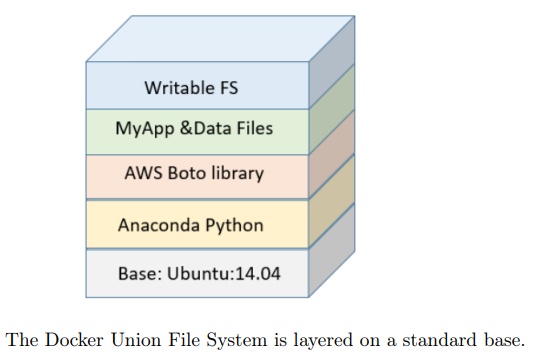
The container footprint on the host file system is limited. The containers load faster than virtual machines.
Up and running in:
- Containers: seconds.
- Virtual machines: minutes.
The container can mount a locally hosted directory. Different container instances can share the same locally hosted directory.
A simple way to:
- Share data between containers.
- Make data persistent.
Docker - Configure and run a custom container
Container images are stored in a public repository
The image definition is done by a “Dockerfile”: The Dockerfile is a sequence of bash-like script commands used to prepare the environment.
It is possible to share the images, sharing the Dockerfile.
Example of a dockerfile:
FROM python:3.6-alpine
MAINTAINER your name <yourname@...>
COPY boot.sh boot.sh
RUN chmod +x boot.sh
ENTRYPOINT [“/boot.sh”]
Conclusions
Containers are a feasible solution for computing tasks on the cloud.
- Designed with the TMM in mind: Prototype on local resources, production in cloud.
- Designed with the scalability in mind: Run on on-premises resources, scale on the cloud.