HPC - Lecture 11 - Introduction to GPU computing
Von Neumann Machine vs GPU
The traditional Von Neumann Machine architecture consists of a CPU (containing a Control Unit and an Arithmetic Logic Unit), Memory, and Input/Output devices. Instructions and data flow between these components, with the Control Unit managing the execution.
Modern Graphics Cards (GPUs) were originally designed as specialized output devices to accelerate 2D and 3D rendering. They connect via slots such as PCI, AGP, or PCIe.
A typical GPU includes:
- GPU Core (2D and 3D engines)
- Memory Controller
- Video Processor, MPEG Decoder, and Playback Video unit
- Video Capture unit
- Dedicated Video Memory (VRAM)
- Output Interfaces: VGA, DVI, HDMI
Graphics Processing Unit (GPU) Pipeline
The 3D rendering process follows a specific pipeline managed via APIs like OpenGL or DirectX:
- Vertex Operations: Processes 3D Vertices.
- Primitives Assembly and Rasterization: Converts transformed vertices into Fragments.
- Fragment Operations: Processes Colored Fragments.
- Raster Operations: Outputs the final Pixels.
Note
The Fragment and Raster Operations are considered the more computationally intensive stages of the pipeline.
Architectural Evolution
- Specialized Processors: Historically, GPUs used distinct sets of specialized cores for vertices and fragments (e.g., GeForce 6, 2004).
- Unified Architecture: Modern GPUs use a unified set of generic Stream Processors (SPs) to handle both types of processing (e.g., Ampere, Blackwell).
General-Purpose computing on GPUs (GPGPU)
GPGPU refers to using a GPU for non-graphics computations.
Evolution of GPGPU Programming
- Early Stage: Applications were created solely using 3D drawing APIs (OpenGL, Cg). Developers had to reformulate scientific problems as graphical ones, expressing data in terms of vertices, triangles, and polygons. This complicated programming limited GPU adoption.
- Modern Stage: Transitioned to GPU Computing via fully programmable Streaming Multiprocessors (SMs) and dedicated languages like CUDA.
- Fully Programmable SMs: Includes instruction cache, memory, and control logic.
- Reduced Cost: More SPs share cache and control logic.
- Memory Access: Additional instructions for random addressing.
When to use GPUs
Remark
Not all applications benefit from GPUs.
- CPU Strengths: Sequential execution, complex logic control instructions, database management, recursive algorithms.
- GPU Strengths: High arithmetic intensity, high degree of parallelism (same operation on many data), and very limited control conditions.
Hardware Architecture: Modern GPUs
GeForce Ampere (2020)
Features the Streaming Multiprocessor (SM) as the fundamental unit of parallelism.
GeForce Blackwell (2024)
Includes several specialized components within the SM:
- FP32 / INT32 cores
- 5th Generation Tensor Cores (for AI/ML acceleration)
- 4th Generation RT Cores (Ray Tracing)
- 128 KB L1 Data Cache / Shared Memory
- RT Core Engines: Box Intersection, Triangle Cluster Intersection, Linear Swept Spheres.
Parallel Architectures: Flynn’s Taxonomy
Flynn’s taxonomy classifies computer systems based on the stream of instructions and data:
- SISD (Single Instruction Single Data): Sequential mono-processor.
- SIMD (Single Instruction Multiple Data): One processor controls several ALUs executing the same instruction on different data. GPUs follow this paradigm.
- MISD (Multiple Instruction Single Data): Multiple instructions on one data stream (rare, includes pipelines).
- MIMD (Multiple Instruction Multiple Data): Different processors execute different instructions on different data.
CUDA: Compute Unified Device Architecture
Introduced by NVIDIA, CUDA is a general-purpose programming model and API (C/C++ extensions) that treats the GPU as a data-parallel co-processor (accelerator).
Programming Model
- Host: The CPU and its memory.
- Device: The GPU and its dedicated DRAM.
- Kernel: The parallel part of the application executed on the device within many threads. The device runs only one kernel at a time (depending on compute capability).
Thread Execution Hierarchy
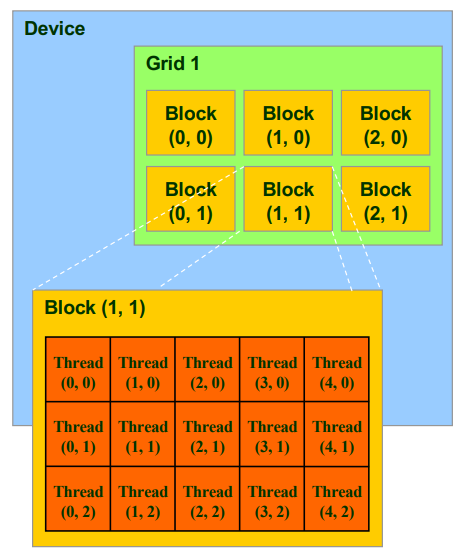
A kernel is executed as a Grid of Thread Blocks.
- Grid: A collection of blocks.
- Block: A collection of threads. Threads within the same block can cooperate via Shared Memory and Synchronization.
- Threads in different blocks cannot cooperate.
Identifiers:
- blockIdx: Index of the block within the grid (1D or 2D).
- threadIdx: Index of the thread within the block (1D, 2D, or 3D).
- dim3: Predefined type representing a 3D vector. Not declared fields are automatically set to 1.
- blockDim: Number of threads in a block.
- gridDim: Number of blocks in a grid.
Memory Spaces
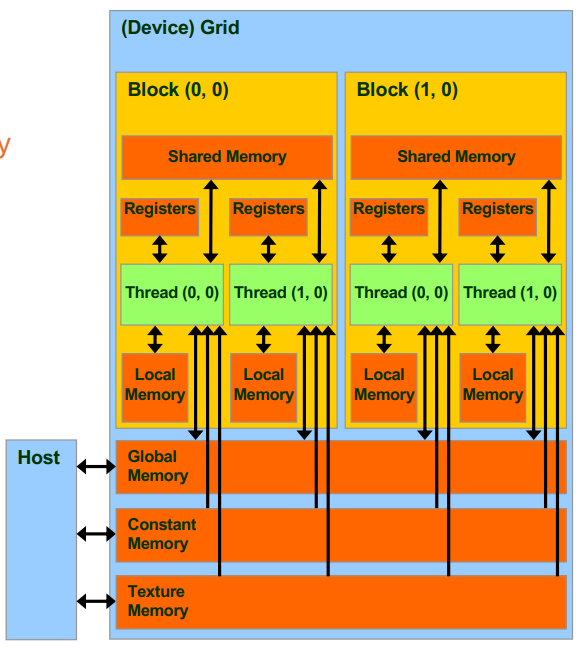
| Memory Space | Scope | R/W Access | Latency |
|---|---|---|---|
| Registers | Thread | R/W | Low |
| Local Memory | Thread | R/W | High |
| Shared Memory | Block | R/W | Low |
| Global Memory | Grid | R/W | High |
| Constant Memory | Grid | RO | High |
| Texture Memory | Grid | RO | High |
The Host can R/W to Global, Constant, and Texture memories (high-latency operations).
Decomposition in GPU Computing
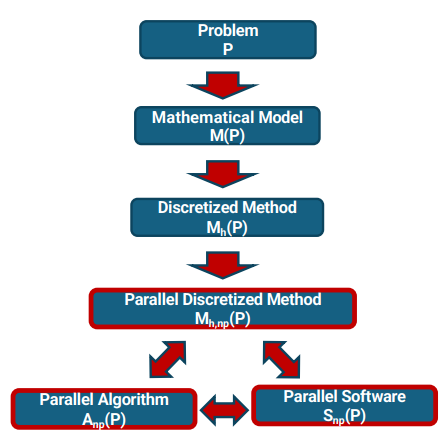
The goal is to map a parallel algorithm
Problem decomposition and CUDA Kernels: We have seen function decomposition where different tasks of the method are mapped to different kernels or kernel phases. We have also seen domain decomposition where data is split into subdomains or chunks mapped to threads and blocks.
In CUDA view we have:
- A grid of blocks represents the decomposition of the global data/domain.
- Threads in a block process local pieces of data.
- Different kernels implement different functions in the discretized method (e.g., compute residual, update solution).
Once we determine what can be done in parallel, we design CUDA kernels that operate on independent data elements and adhere to our decomposition strategy.
The Modeling Flow
- Problem
- Mathematical Model
- Discretized Method
- Parallel Discretized Method
- Parallel Algorithm
- Parallel Software
Decomposition Strategies
- Functional Decomposition: Different tasks or stages of the method are mapped to different kernels or kernel phases.
- Domain Decomposition: Data is split into subdomains or chunks, mapped to threads and blocks.
- CUDA View: A grid of blocks represents the global domain; threads in a block process local data.
Development of GPU Components
The development process follows three main phases:
- Requirement and Source-code Analysis:
- Identify data and functional parallelism.
- Analyze memory requirements and bottlenecks.
- Incremental Development of CUDA Kernels:
- Determine partitioning strategy and execution configuration.
- Utilize libraries and perform initial testing.
- Testing and Optimization:
- Application Profiling.
- Evaluation of execution flow, occupancy, coalescing, host-device transfers, and shared-memory usage.
CUDA Application Structure
- Declare host and device variables.
- Allocate host memory (
malloc) and device memory (cudaMalloc). - Initialize host data.
- Transfer data: Host
Device ( cudaMemcpywithcudaMemcpyHostToDevice). - Execute Kernel: Host configures and launches the kernel.
- Transfer results: Device
Host ( cudaMemcpywithcudaMemcpyDeviceToHost). - Free memory:
free(host) andcudaFree(device).
Memory Management API
Allocation
cudaError_t cudaMalloc (void ** devPtr, size_t size);
Initialization
cudaError_t cudaMemset (void * devPtr, int value, size_t count);
- Used to set device memory to a specific value (e.g., resetting an array to 0).
Data Transfer
cudaError_t cudaMemcpy (void * dest, void * src, size_t nBytes, enum cudaMemcpyKind kind);
- Note: These are blocking functions; they do not start until previous CUDA API calls are completed.
CUDA Kernels
Function Qualifiers
__global__: Called by host, executed on device. Must returnvoid.__device__: Called by device, executed on device.__host__: (Optional) Executed on host.
Kernel Features
- Return type must be
void. - Cannot be recursive.
- Must have a fixed number of parameters.
- Cannot use
staticvariables. - Can only access GPU memory space.
Thread Indexing
To map a thread to a unique data element in a 1D array:
Boundary Check
Since the total threads launched might exceed the array size
int index = threadIdx.x + blockIdx.x * blockDim.x;
if (index < N) {
    c[index] = a[index] * b[index];
}
Without this check, the extra threads would access invalid memory areas.
Compilation
The nvcc compiler separates code:
- Host code: Compiled with the system compiler (GCC or Visual C).
- Device code: Compiled into PTX (Parallel Thread Execution) format, an Instruction Set Architecture (ISA) for NVIDIA GPUs.
- A final translator (or runtime interpreter) transforms PTX into binary code.
Command Line Examples:
nvidia-smi: Check GPU model and features.nvcc ex.cu -o ex: Compile../ex 10: Execute with 10 elements.
Exercises
Exercise 1 - implement the code for the Hadamard product with CUDA Exercise 2 - implement the code for the Scalar product with CUDA
#include <cuda.h>
#include <cuda_runtime.h>
#include <stdio.h>
#include <stdlib.h>
#include <time.h>


void initializeMatrix(int* matrix, int M, int N){
    int i,j;
    for(i=0;i<N;i++)
        for(j=0;j<M;j++)
            matrix[i*M+j]=i*M+j;
}

void printMatrix(int*matrix, int M, int N)
{
    int i,j;
    for(i=0;i<N;i++){
        for(j=0;j<M;j++)
            printf("%d ", matrix[i*M+j]);
        printf("\n");
    }
}

void equalMatrix(int* m1, int*m2, int M, int N)
{
    int i, j;
    for(i=0;i<N;i++){
        for(j=0;j<M;j++){
            if(m1[i*M+j]!=m2[i*M+j]){
                printf("The host and device results are different.\n");
            return;
            }
        }
    }

    printf(" The host and device results are the same.\n");
}

void HadamardProductMatricesCPU(int *in1, int *in2, int *out, int row, int col) {
    for (int i = 0; i < row; i++) {
        for (int j = 0; j < col; j++) {
            out[i*col+j] = in1[i*col+j] * in2[i*col+j];
        }
    }
}

void ScalarProductMatricesCPU(int *in1, int k, int *out, int row, int col){
    for(int i=0; i < row; i++){
        for(int j=0; j<col; j++){
            out[i*col+j] = in1[i*col+j] * k;
        }
    }
}

__global__ void HadamardProductMatricesGPU(int *in1, int *in2, int *out, int row, int col){
    int indexRow=threadIdx.y + blockIdx.y*blockDim.y;
    int indexCol=threadIdx.x + blockIdx.x*blockDim.x;
    if(indexRow<row && indexCol<col){
        out[indexRow*col+indexCol]=in1[indexRow*col+indexCol]*in2[indexRow*col+indexCol];
    }

}

__global__ void ScalarProductMatricesGPU(int *in1, int k, int *out, int row, int col){
    int indexRow=threadIdx.y + blockIdx.y*blockDim.y;
    int indexCol=threadIdx.x + blockIdx.x*blockDim.x;
    if(indexRow<row && indexCol<col){
        out[indexRow*col+indexCol]=in1[indexRow*col+indexCol]*k;
    }

}


int main(int argn, char * argv[]){
    srand(time(NULL));

    dim3 nBlocks(1,1,1), nThreadsPerBlock(1,1,1);
    int k=0;
    int M,N;
    int *A_host, *B_host, *C_host, *Ak_host;
    int *A_device, *B_device, *C_device,*copy, *Ak_device, *Ak_copy;
    int size,flag;
    printf("***\t MATRICES MULTIPLICATION \t***\n");

    if(argn < 7){
        printf(" Insufficient number of parameters.\n");
        printf(" Usage: : %s <M> <N> <NumThreadsPerBlock.x> <NumThreadsPerBlock.y> <flag for print>\n", argv[0]);
        printf("Default values will be used. \n");
        nThreadsPerBlock.x=4;
        nThreadsPerBlock.y=3;
        M=9;
        N=12;
        flag=1;
        k = 2;
    }else{
        M=atoi(argv[1]);
        N=atoi(argv[2]);
        nThreadsPerBlock.x=atoi(argv[3]);
        nThreadsPerBlock.y=atoi(argv[4]);
        flag=atoi(argv[5]);
    }

    // correct computation of the number of blocks
    nBlocks.y=M/nThreadsPerBlock.y + ((M%nThreadsPerBlock.y)==0?0:1);
    nBlocks.x=N/nThreadsPerBlock.x + ((N%nThreadsPerBlock.x)==0?0:1);
    size=M*N*sizeof(int);

    // print of kernel configuration
    printf("Matrices size = %d * %d\n",M, N);
    printf(" Number of threads per block = %d * %d\n", nThreadsPerBlock.y,nThreadsPerBlock.x);
    printf("Number of blocks = %d * %d\n\n",nBlocks.y,nBlocks.x);

    //Host memory allocation
    A_host=(int*)malloc(size);
    B_host=(int*)malloc(size);
    C_host=(int*)malloc(size);
    Ak_host = (int*)malloc(size);
    copy=(int*)malloc(size);
    Ak_copy = (int*)malloc(size);


    //device memory allocation
    cudaMalloc((void**)&A_device,size);
    cudaMalloc((void**)&B_device,size);
    cudaMalloc((void**)&C_device,size);
    cudaMalloc((void**)&Ak_device, size);

    // initialize host matrices
    initializeMatrix(A_host,M, N);
    initializeMatrix(B_host,M, N);

    // copy data from host to device
    cudaMemcpy(A_device, A_host, size, cudaMemcpyHostToDevice);
    cudaMemcpy(B_device, B_host, size, cudaMemcpyHostToDevice);

    //Matrix-Matrix Multiplication
    //kernel launch
    HadamardProductMatricesGPU<<<nBlocks, nThreadsPerBlock>>>(A_device, B_device, C_device, M, N);

    // copy the results from device to host
    cudaMemcpy(copy, C_device, size, cudaMemcpyDeviceToHost);
    HadamardProductMatricesCPU(A_host, B_host, C_host,M, N);

    //Matrix-scalar Multiplication
    ScalarProductMatricesGPU<<<nBlocks, nThreadsPerBlock>>>(A_device, k, Ak_device, M, N);
    //copy the results from device to host
    cudaMemcpy(Ak_copy, Ak_device, size, cudaMemcpyDeviceToHost);
    ScalarProductMatricesCPU(A_host, k, Ak_host, M,N);


    //print the matrices and the results
    if(flag==1){
        printf("Hadamard Product\n\n");
        printf("matrix A\n\n"); printMatrix(A_host,M,N);
        printf("matrix B\n\n"); printMatrix(B_host,M,N);
        printf("Host results\n\n"); printMatrix(C_host,M, N);
        printf("Device results\n\n"); printMatrix(copy,M,N);

        //Check if they are equal
        equalMatrix(copy, C_host,M,N);

        printf("\n\nScalar Product\n\n");
        printf("matrix A\n\n"); printMatrix(A_host, M,N);
        printf("Host results\n\n"); printMatrix(Ak_host, M,N);
        printf("Device results\n\n"); printMatrix(Ak_copy, M,N);

        //Check if they are equal
        equalMatrix(Ak_copy, Ak_host, M,N);

    }


    //host memory de-allocation
    free(A_host);
    free(B_host);
    free(C_host);
    free(copy);

    //device memory de-allocation
    cudaFree(A_device);
    cudaFree(B_device);
    cudaFree(C_device);
    exit(0);

}
What is “pitch”
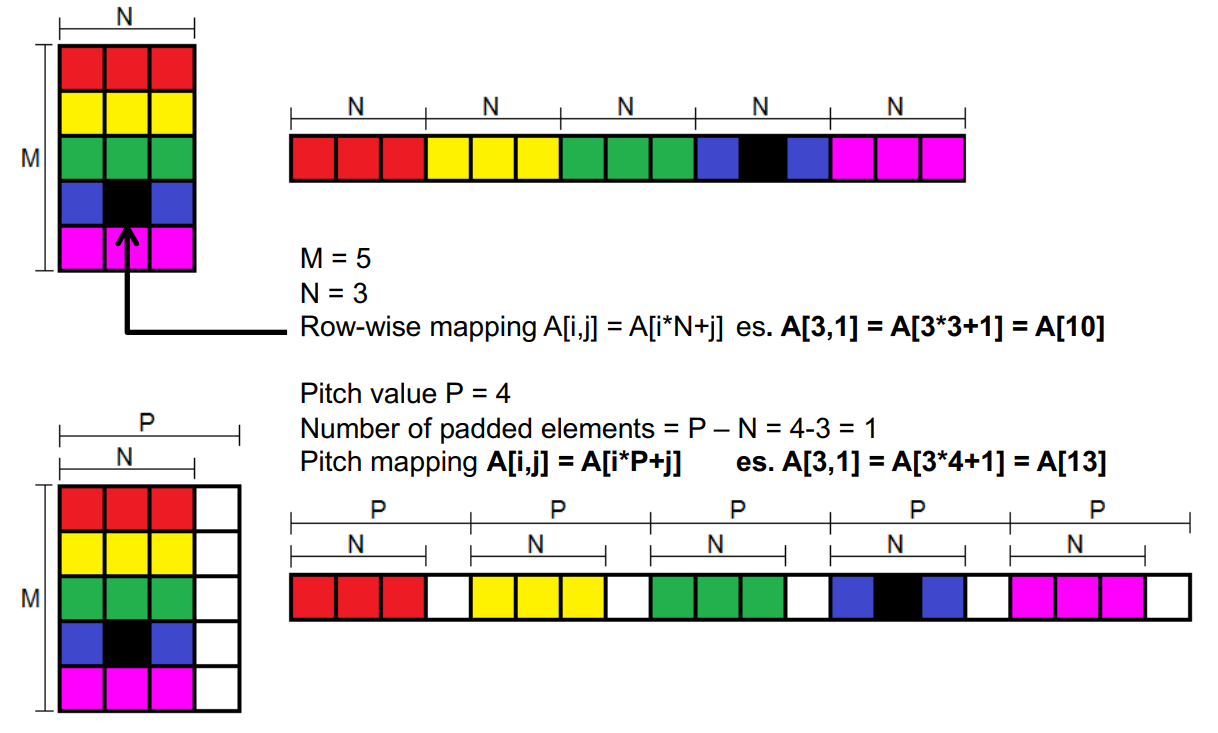
If a matrix with M rows and N columns is stored in the device’s global memory, the pitch is the row width in bytes, including any padding added for alignment, to read/write the matrix as quickly as possible!
When a matrix is allocated with pitch, its rows are automatically padded (with respect to the pitch value): this requires a small change in the way indices are computed inside the kernel.
In the previous exercise we had that a matrix of size
With pitch, matrices are linearized row by row and stored as arrays. However, the computation of the array position for the generic element
The pitch allocation function is:
cudaError_t cudaMallocPitch(void** devPtr, size_t* pitch, size_t widthInBytes, size_t height);- Takes in input: widthInBytes e.g.
N*sizeof(int)and height e.g.M(number of rows) - Output is devPtr i.e point to the allocated 2D array and pitch pitch value in bytes.
If M*N is too large and there is not enough memory then cudaMallocPitch() returns cudaError_t.
When exchanging data between CPU and GPU and you allocated with pitch, you need to use:
cudaError_t cudaMemcpy2D(void *dst, size_t dpitch, const void *src, size_t spitch, size_t width, size_t height, enum cudaMemcpyKind direction);dstis the memory area in which to copy (DEVICE)dpitchis the pitch value ofdstsrcis the memory area to be copied (HOST)spitchis the pitch value ofsrcwidthis the row size in bytesheightis the column size to be copieddirectionis the direction (HostToDevice or DeviceToHost) of the copy
Checking Errors
CUDA timing functions
CUDA provides specific functions for timing.
The main CUDA timing functions are:
- timer creation:
cudaEventCreate(cudaEvent_t *); - timer start/stop:
cudaEventRecord(cudaEvent_t *, cudaStream_t) - synchronization:
cudaEventSynchronize(cudaEvent_t); - cudaEventElapsedTime: `cudaEventElapsedTime(float *,cudaEvent_t,cudaEvent_t);