HPC - Lecture 13 - MatMat GPU
Matrix Multiplication
The objective is to compute the matrix product:
By exploiting SIMD (Single Instruction, Multiple Data) data parallelism, we assign each thread
We should organize the kernel blocks and threads using the same 2D array structure of matrices: each thread 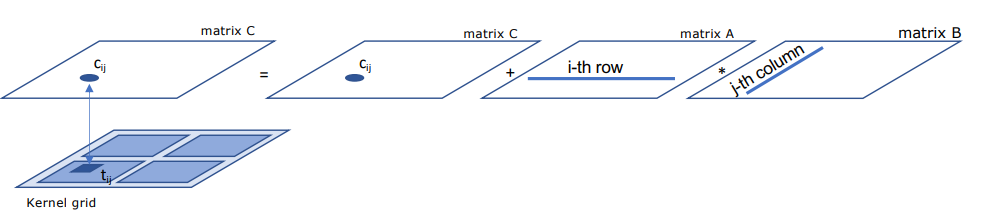
Execution Grid Organization
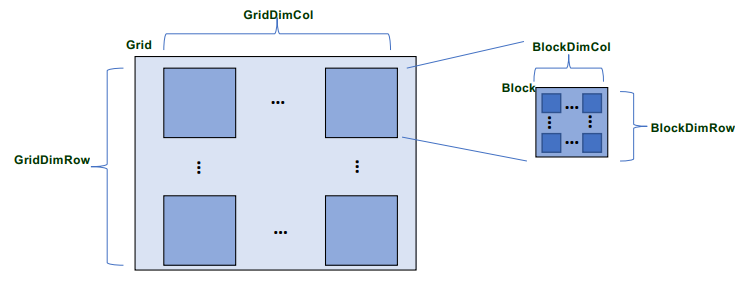
Let BlockDimRow and BlockDimCol be the numbers of threads in the 2D thread block.
Assume for simplicity that N and P are multiples of BlockDimRow and BlockDimCol respectively.
For an execution grid with square thread blocks (e.g.,
GridDimRow=GridDimCol=
Kernel Algorithms
Kernel 1: Global Memory Access
BlockDimRow and BlockDimCol correspond to the environment variables blockDim.x and blockDim.y, so each thread has the usual global identifiers:
idglob_x = blockDim.x * blockIdx.x + threadIdx.x;
idglob_y = blockDim.y * blockIdx.y + threadIdx.y;
The kernel computes the dot product between the row of idglob_x and the column of idglob_y.
Observe that, in this algorithm, each thread inside the kernel must perfom 2M accesses to global memory in order to execute 2M operations.
function matmatgpu1
void matmatgpu1(int lda, int ldb, int ldc, double *A, double *B, double *C, int N1, int N2, int N3)A, B, and C initially reside in host memory, and we must transfer them to device memory using Ad, Bd, and Cd, which are allocated in global memory.
Note that if the leading dimensions lda, ldb, ldc of the arrays do not coincide with the number of columns of the matrices, then the corresponding rows are not contiguous in memory. To perform a single transfer, it can be useful to use a memory area (buffer) in which the elements are packed before the transfer.
After configuring the grid and executing the kernel, we transfer the results back to host memory.
For the function matmatgpu1, we assume that N and P are multiples of BlockDimRow and BlockDimCol, but a generalization that does not significantly alter its structure is possible.
void matmatgpu1(int lda, int ldb, int ldc, double *A, double *B, double *C, int N1, int N2, int N3) {
    // kernel prototype
    // void kernel1(double *, double *, double *, int, int, int);

    double *Adev, *Bdev, *Cdev, *buffer;
    int i, j, max, BlockDimRow, BlockDimCol;

    // determine buffer size
    int maxi = (N1 > N2) ? N1 : N2;
    maxi = (N3 > maxi) ? N3 : maxi;
    buffer = (double *)malloc(sizeof(double) * maxi * maxi);

    // device memory allocation
    cudaMalloc((void**)&Adev, sizeof(double) * N1 * N2);
    cudaMalloc((void**)&Bdev, sizeof(double) * N2 * N3);
    cudaMalloc((void**)&Cdev, sizeof(double) * N1 * N3);

    // transfer matrix A
    for(i = 0; i < N1; i++) {
        for(j = 0; j < N2; j++) {
            *(buffer + i * N2 + j) = *(A + i * lda + j);
        }
    }
    cudaMemcpy(Adev, buffer, sizeof(double) * N1 * N2, cudaMemcpyHostToDevice);

    // transfer matrix B
    for(i = 0; i < N2; i++) {
        for(j = 0; j < N3; j++) {
            *(buffer + i * N3 + j) = *(B + i * ldb + j);
        }
    }
    cudaMemcpy(Bdev, buffer, sizeof(double) * N2 * N3, cudaMemcpyHostToDevice);

    // transfer matrix C
    for(i = 0; i < N1; i++) {
        for(j = 0; j < N3; j++) {
            *(buffer + i * N3 + j) = *(C + i * ldc + j);
        }
    }
    cudaMemcpy(Cdev, buffer, sizeof(double) * N1 * N3, cudaMemcpyHostToDevice);

    // grid configuration and kernel execution
    BlockDimRow = 32; BlockDimCol = 32;
    dim3 DimBlock(BlockDimRow, BlockDimCol);
    dim3 DimGrid(N1 / BlockDimRow, N3 / BlockDimCol);

    kernel1 <<< DimGrid , DimBlock >>> (Adev, Bdev, Cdev, N1, N2, N3);
    cudaDeviceSynchronize();

    // transfer result
    cudaMemcpy(buffer, Cdev, sizeof(double) * N1 * N3, cudaMemcpyDeviceToHost);
    for(i = 0; i < N1; i++) {
        for(j = 0; j < N3; j++) {
            *(C + i * ldc + j) = *(buffer + i * N3 + j);
        }
    }

    // cleanup
    cudaFree(Adev); cudaFree(Bdev); cudaFree(Cdev);
    free(buffer);
} // end function
The kernel called by the function matmatgpu1 defines the global identifiers and computes the dot product between one row of A and one column of B.
__global__ void kernel1(double *Adev, double *Bdev, double *Cdev, int N1, int N2, int N3){
    int k, idglob_x, idglob_y;
    double sum;
    idglob_x = blockDim.x*blockIdx.x + threadIdx.x; // global thread identifiers
    idglob_y = blockDim.y*blockIdx.y + threadIdx.y;
    sum = Cdev[idglob_x *N3 + idglob_y];
    for(k = 0; k < N2; k++){ // dot product computation
        sum = sum + Adev[idglob_x*N2 + k ] * Bdev[idglob_y + k*N3];
    }
    Cdev[idglob_x *N3 + idglob_y] = sum;
} // end kernel1
Kernel 2: Shared Memory Optimization
An important feature of the CUDA programming model is the presence of shared memory, which is shared by all threads in a single block of the kernel execution grid. Shared memory has a latency approximately 100 times lower than global memory.
To this end consider the case of an execution grid in which the thread blocks are square (e.g., BlockDimRoow = BlockDimCol = 32). The product of
where each block of
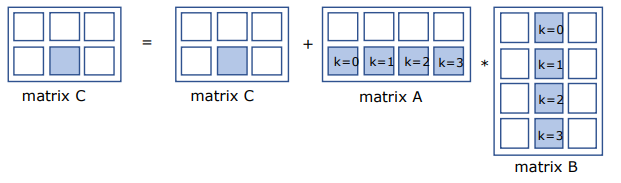
The kernel computes the product in
This feature implies that, for a fixed step k, each thread in a block can concurrently copy one element of A and one element of B from global memory to shared memory, in parallell, with the other threads in the block.
Since shared memory is shared by all the threads in the block, each thread can then compute one contribution to the dot product using the data stored in the shared memory and loaded by the other threads.
More precisely, each thread computes the dot product in
The case considered here assumes that the matrix dimensions are multiples of BlockDimRow = BlockDimCol = 32. A generalization must take into account any inactive threads.
It is important to note that, in this algorithm, each thread in the kernel performs only one access to global memory to execute a larger number of operations (32 in this example).
The following kernel2 function, called from the function matmatgpu1, includes synchronization instructions that ensure all threads have finished copying their own elements of A and B into shared memory before proceeding with the dot product computation.
__global__ void kernel2 (double *Adev, double *Bdev, double *Cdev, int N1, int N2, int N3){
    __shared__ double Ashared[32][32], Bshared[32][32];
    int idglob_x = blockDim.x*blockIdx.x + threadIdx.x;
    int idglob_y = blockDim.y*blockIdx.y + threadIdx.y;
    double sum = Cdev[idglob_x *N3 + idglob_y];
    for(int k = 0; k < N2/32 ; k++){
        Ashared[ threadIdx.x ][ threadIdx.y ] = Adev[ idglob_x*N2 + threadIdx.y + 32*k];
        Bshared[ threadIdx.x ][ threadIdx.y ] = Bdev[ idglob_y + (32*k+threadIdx.x)*N3];
        __syncthreads();
        for(int kk=0; kk<32; kk++)
            sum += Ashared[ threadIdx.x ][ kk ] * Bshared[ kk ][ threadIdx.y ];
        __syncthreads();
    }
    Cdev[idglob_x *N3 + idglob_y] = sum;
}
Matrix Multiplication in Hybrid Context
When a kernel is launched, control immediately returns to the calling program running on the CPU. For example in the function matmatgpu1, the function cudaDeviceSynchronize() is used, which suspends the execution of the program running on the host untile the kernel has completed.
We can develop hybrid applications where the CPU and GPU compute parts of matrix
In the case of matrix multiplication, the idea is to split the computation of matrix 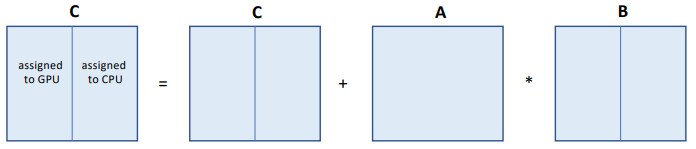
Load distribution
WIth this partitioning, the main problem is determining how many columns of matrix
Let
The following graph show sa model of the trends of 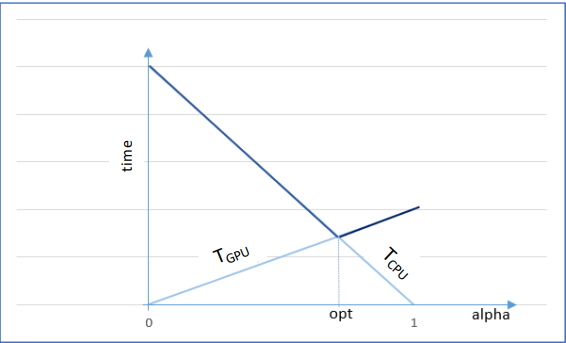
The main factors that influence this choice are:
- CPU and GPU processing speed
- memory transfer speed
- amount of data to transfer
We usually proceed experimentally, observing that the performance ratio between CPU and GPU generally lies between 10 and 20.
A simple strategy to distribute workload proportionally to performance ratio
It is easy to observe that, in this way, the workload is distributed between the two devices proportionally to the performance ratio.
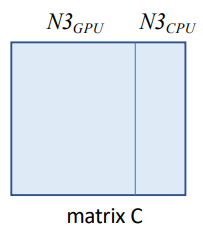
the hybrid function matmatgpu3
The hybrid function matmatgpu3 leverages matmatthreadomp (CPU) and kernel2 (GPU) concurrently to minimize total execution time.
The function matmatgpu3, which implements this hybrid strategy, has a structure similar to that of the function matmatgpu1.
It should be noted that:
- The choice of Q determines how many columns of matrix C to assign to the two devices
- The value
and are used to transfer the matrices between host memory and device memory and to compute the portions of matrix assigned to the two devices.
We can use the fucntion matmatthreadomp (for CPU execution) and kernel2 (for GPU execution).
Since kernel launch is asynchronous, matmatthreadomp can continue executing concurrently with the kernel, thereby reducing the total execution time compared to matmatgpu1.
As for the other functions, it is assumed that N is a multiple of the block size used by the function matmatthreadomp (dbN=dbM=dbP=256) and of the number of threads activated per block in the kernel execution grid (32×32).
The hybrid function matmatgpu3:
void matmatgpu3(int lda, int ldb, int ldc, double *A, double *B, double *C,
                int N1, int N2, int N3, int DB1, int DB2, int DB3, int ntrow, int ntcol) {
    // kernel prototype
    // void kernel2(double *, double *, double *, int, int, int);
    void matmatthreadomp(int, int, int, double *, double *, double *, int, int, int,
                         int, int, int, int, int);

    double *Adev, *Bdev, *Cdev, *buffer;
    int Q, Pgpu, Pcpu;
    int i, j, max, BlockDimRow, BlockDimCol;

    Q = 15;
    Pgpu = N3 * Q / (Q + 1);
    Pcpu = N3 / (Q + 1);

    if (N1 > N2) max = N1; else max = N2;
    if (N3 > max) max = N3;
    buffer = (double *)malloc(sizeof(double) * max * max);

    cudaMalloc((void**)&Adev, sizeof(double) * N1 * N2); // device memory allocation
    cudaMalloc((void**)&Bdev, sizeof(double) * N2 * Pgpu);
    cudaMalloc((void**)&Cdev, sizeof(double) * N1 * Pgpu);

    // transfer matrix A
    for (i = 0; i < N1; i++) {
        for (j = 0; j < N2; j++) {
            *(buffer + i * N2 + j) = *(A + i * lda + j);
        }
    }
    cudaMemcpy(Adev, buffer, sizeof(double) * N1 * N2, cudaMemcpyHostToDevice);

    // transfer matrix B
    for (i = 0; i < N2; i++) {
        for (j = 0; j < Pgpu; j++) {
            *(buffer + i * Pgpu + j) = *(B + i * ldb + j);
        }
    }
    cudaMemcpy(Bdev, buffer, sizeof(double) * N2 * Pgpu, cudaMemcpyHostToDevice);

    // transfer matrix C
    for (i = 0; i < N1; i++) {
        for (j = 0; j < Pgpu; j++) {
            *(buffer + i * Pgpu + j) = *(C + i * ldc + j);
        }
    }
    cudaMemcpy(Cdev, buffer, sizeof(double) * N1 * Pgpu, cudaMemcpyHostToDevice);

    // grid configuration and kernel execution
    BlockDimRow = 32; BlockDimCol = 32;
    dim3 DimBlock(BlockDimRow, BlockDimCol);
    dim3 DimGrid(N1 / BlockDimRow, Pgpu / BlockDimCol);

    kernel2 <<< DimGrid, DimBlock >>> (Adev, Bdev, Cdev, N1, N2, Pgpu); // kernel launch
    matmatthreadomp(lda, ldb, ldc, A, B + Pgpu, C + Pgpu, N1, N2, Pcpu, DB1, DB2, DB3, ntrow, ntcol);
    cudaDeviceSynchronize();

    // transfer result
    cudaMemcpy(buffer, Cdev, sizeof(double) * N1 * Pgpu, cudaMemcpyDeviceToHost);
    for (i = 0; i < N1; i++) {
        for (j = 0; j < Pgpu; j++) {
            *(C + i * ldc + j) = *(buffer + i * Pgpu + j);
        }
    }

    // cleanup
    cudaFree(Adev); cudaFree(Bdev); cudaFree(Cdev);
    free(buffer);
} // end function
Performance comparison on a single node
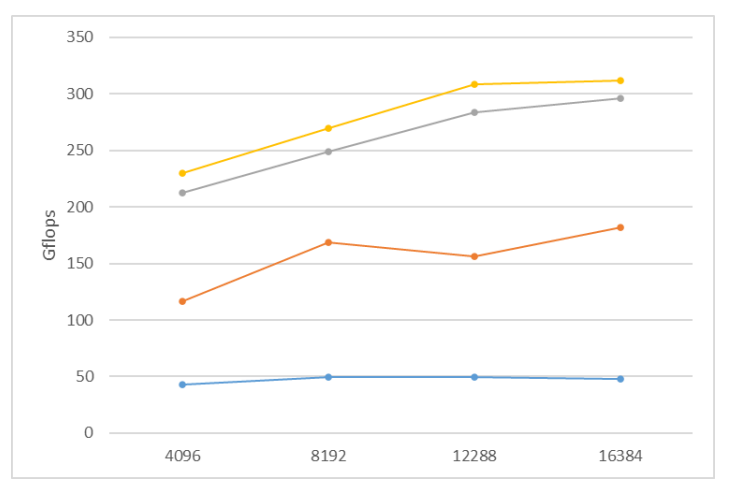
The Gflops performance of the following functions is reported as the matrix size N varies:
- blue line: matmatthread with 16 threads (multicore CPU only)
- orange line: matmatgpu1 calling kernel 1 (GPU only)
- gray line: matmatgpu1 calling kernel 2 (GPU only)
- yellow line: matmatgpu3 concurrently calling kernel 2 and matmatthreadomp with 16 threads (GPU+CPU)
Note the remarkable performance increase achieved with the GPU.
Software architecture
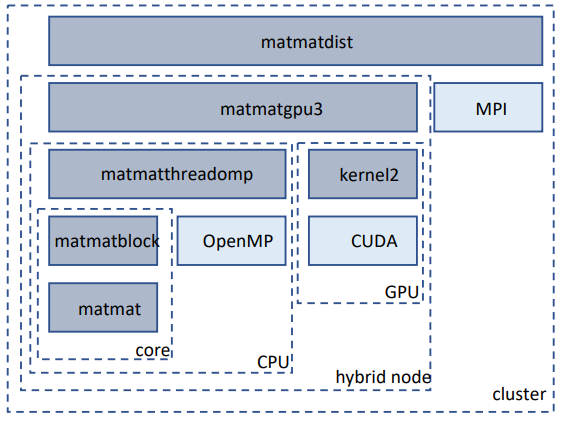
We can use the function matmatgpu3 instead of matmatthreadomp within matmatdist, thereby building a software architecture that optimally manages all available parallelism on the computing system used for the course.
- matmatdist optimizes performance over the whole cluster
- matmatgpu3 optimizes performance on a single hybrid node (multicore CPU + GPU)
- matmatthread optimizes performance on a multicore CPU
- kernel2 optimizes performance on a single GPU
- matmatblock optimizes performance on a single CPU core
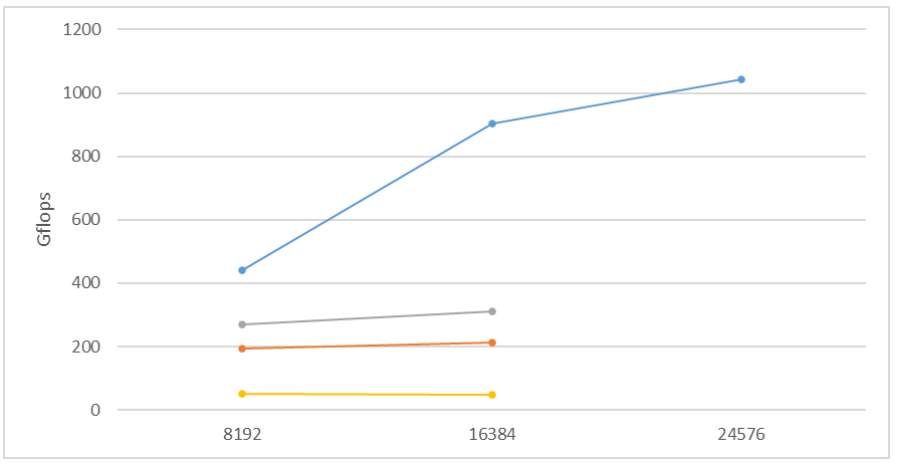
Performance comparison on a cluster
As the matrix size N varies, the performance comparison among the following functions is reported:
- blue line: matmatdist with NP=4 nodes + matmatgpu3 (matmatthread with NT=16 and kernel2)
- orange line: matmatdist with NP=4 nodes + matmatthread with NT=16 threads
- gray line: matmatgpu3 (matmatthread with NT=16 and kernel2)
- yellow line: matmatthread with NT=16
The performance increase from matmatthread to matmatdist using matmatgpu3 is about 20x.
Assignment
A single file named matmatdisthyb.cu containing functions:
matmatikjmatmatblockmatmatthreadmatmatgpu3kernel2matmatdist