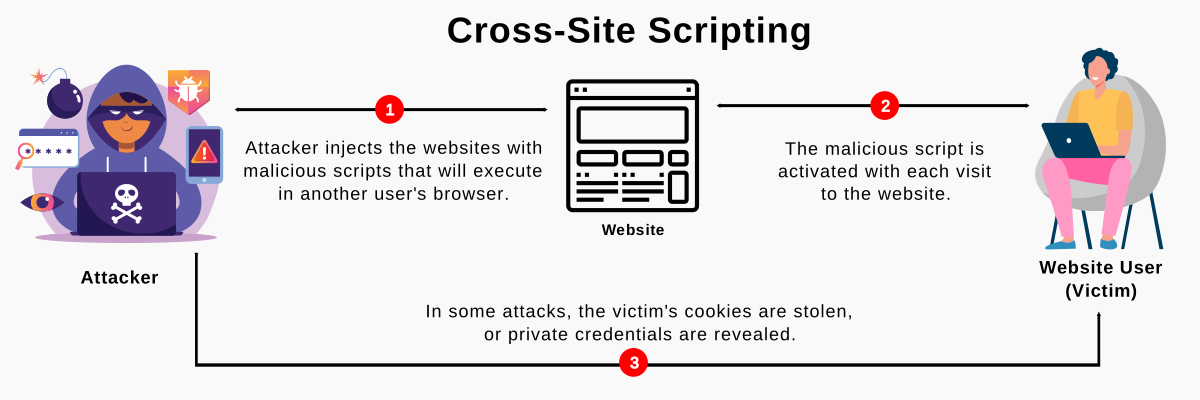
XSS
- XSS or Cross-site scripting
- XSS can be prevented through input validation and sanitization or output validation
- To find XSS you have to submit simple unique input into every entry point in the application
- Can be mitigated through Content security policy
- 📖 Dangling Markup Injection
- XSS real life attacks
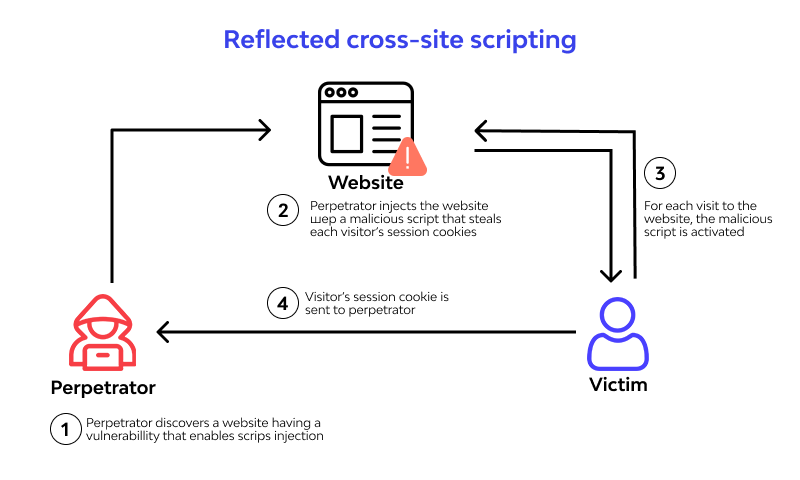
Reflected cross-site scripting
Stored cross-site scripting
%20XSS%20attacks.png)
DOM-based cross-site scripting
%20based%20XSS%20attacks.png)
-
Sources: A source is a JavaScript property that accepts data that is potentially attacker-controlled
-
Sinks: A sink is a potentially dangerous JavaScript function or DOM object that can cause undesirable effects if attacker-controlled data is passed to it.
XSS Contexts
Context:
- The location within the response where attacker-controllable data appears.
- Any input validation or other processing that is being performed on that data by the application.
Based on these details, you can then select one or more candidate XSS payloads, and test whether they are effective.
Preventing XSS Attacks
- 📖 Preventing XSS Attacks
- ⭐ From OWASP: 📖 XSS Filter Evasion Cheat Sheet e 📖 XSS Prevention Cheat Sheet
- ❗Minimalist testing is a bad security practice
- Input Validation
- Advanced real-life XSS are often done with multiple and mixed encoding
The only real issue with double encoding is making sure you really understand how the different contexts are nested and how they unfold in the browser. For instance, an HREF is an HTML Attribute so it is first HTML Attribute decoded, then the browser looks at the protocol. If it is HTTP/S then the browser is redirected to the new location. However, if it is the JavaScript protocol it is then URL decoded and then passed to the JavaScript Interpreter. CSS is even more complicated. Then there is also the chance that you encode something correctly for multiple contexts and it is completely fine where it is written into the page - but then the data gets used in yet another context later by JS within the page resulting in an XSS vuln (such as the data being passed to a setTimeout).
- as shown by LiveOverflow, Google uses different subdomains and iframes as isolation in web services like blogger or sites, allowing users to run even malicious javascript but in a way it can be used to steal credentials from other users.
Output enconding
Use libraries that do encoding for you
A primary means to execute injected malicious code is to show malicious code to the user. So a better approach is to combine Input Validation with Output enconding
HTML/XML example of characters escaping:
<→<>→>Javascript example of characters escaping:<→\u003c>→\u003e
In real life you probrably want to make multiple encoding, something like html encoding → css encoding → javascript encoding.
For example:
<a href="#" onclick="javascript:alert('This line needs two layers of escaping')">test</a>Input validation
Libraries that help with XSS
- Dom Purify Javascript quindi agisce lato client
- Google Guava guarda le cartelle: HTML, escape, xml, server side nota che non è una libreria incentrata sulla sicurezza, aggiunge e migliora cose di base.
- Jsoup ha un sacco di Issue aperte ma è su Java, server side
- ESAPI
- HibernateValidator
Allowing safe HTML
- Talvolta in alcuni blog bisogna inserire del markup HTML ed è un requisito di business, di conseguenza l’approccio migliore è quello di filtrare tutti i possibili tag dannosi e JavaScript tramite un approccio whitelist. La difficoltà è che ogni browser ha le sue peculiarità.
- Una altra opzione è usare una libreria come DOMPurify, essendo consapevoli però che col tempo si trovano nuove vulnerabilità XSS e quindi non è una soluzione perfetta.
- Anche il CSS può essere malevolo
Template engine
- Jinja e React hanno il loro sistema di escaping dinamico per default e questo impedisce l’occorrenza di molte XSS
- 🔗 XSS in React
Javascript
- Non ha un proprio sistema di encoding HTML quindi o te lo definisci da solo oppure usi delle librerie. Idem quando passi i dati a JQuery.
Server / Network / DevOps side security
- Web Application Firewall che blocca l’inserimento di tag esempio lab1
- Content Security Policy che blocchi gli script tranne da fonti affidabili, per esempio
selfè una delle policy più restrittive che blocca anche gli inline script. Vedi anche la Cheat Sheet sulla CSP di OWASP - Scanner automatici di codice per le vulnerabilità in fase di CI/CD
- Machine Learning for log analysis or as firewall